Order Export is an add-on of the Checkout for PayPal WordPress plugin that allows you to export order data into a CSV file for reporting, backup, or analysis purposes.
When this add-on is active, a “Export CSV” button will appear in the Checkout for PayPal plugin’s orders menu (Checkout for PayPal > All Orders > Export CSV).
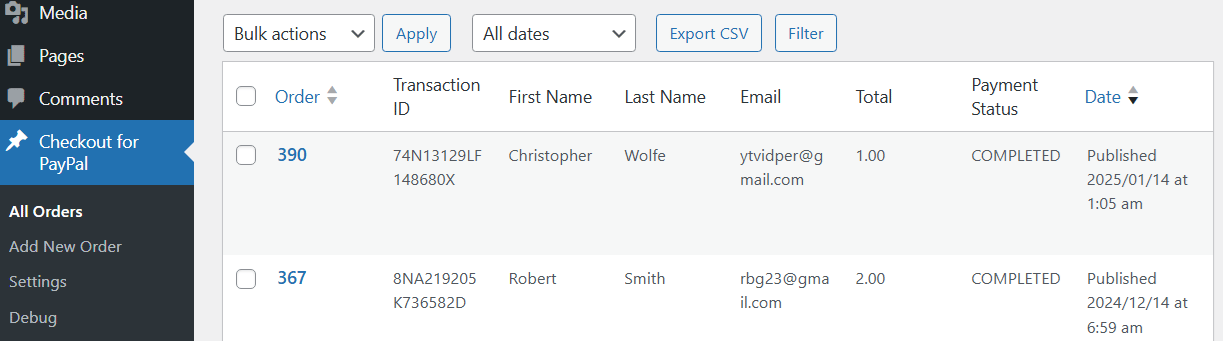
All you need to do is click the “Export CSV” button to export the data shown in the table to a CSV file.
If you do a search before clicking the export button, the CSV file will contain the search results.
CSV File Format
The exported CSV will include the following columns:
| Column Name | Description |
|---|---|
| Order | Order ID |
| Transaction ID | Transaction ID |
| First Name | Customer’s first name |
| Last Name | Customer’s last name |
| Customer’s email address | |
| Total | Total order amount |
| Payment Status | Status of the order |
| Date | Order date |
Viewing the CSV File
The exported CSV file can be opened and viewed using common applications such as Microsoft Excel or Google Sheets.

Important Notes
- Not for Re-import: The exported CSV is not structured for system re-import. It is for external use such as reporting or data analysis.
- Data Accuracy: Ensure your data is correct at the time of export. Any updates made after exporting will not be reflected unless you perform another export.
Get the Order Export Add-on

Checkout for PayPal Order Export
Export Checkout for PayPal orders.
License: Unlimited Websites
Note:
* Do not purchase before setting up the core plugin first. The add-on is not at fault if the core plugin does not work on your website.
* Do not purchase if you are not sure about a feature, contact us instead.
* Do not purchase to ask for more features or make the product work in a certain way.
Price: $39.99
Get All Checkout for PayPal Add-ons

Checkout for PayPal Add-on Bundle
Access to all Checkout for PayPal plugin add-ons.
* Variable Price
* Contact Form 7 Integration
* Order Export
License: Unlimited Websites
Note:
* Do not purchase before setting up the core plugin first. The add-on is not at fault if the core plugin does not work on your website.
* Do not purchase if you are not sure about a feature, contact us instead.
* Do not purchase to ask for more features or make the product work in a certain way.
Price: $49.99
Can I open the csv file in Google Sheets?
@Peter, Absolutely!