Stripe checkout plugin enables Stripe payment gateway on your WordPress site. It seamlessly integrates Stripe checkout functionality into your site and allows you to collect credit and debit card payments. Stripe checkout plugin offers SCA-ready (Strong Customer Authentication) checkout option with mobile-ready experience for your customers.
Features
- Accept payments on a Stripe-hosted payment page
- Accept Stripe one-time payments
- Validate cards in real-time with built-in error messaging
- Accept Stripe recurring payments
- Multiple payment methods for international payments
- Accept donations via Stripe
- Customize Stripe payment buttons
- PCI compliant and SCA-ready (strong customer authentication)
- Send email receipts to customers automatically
- Accept Apple Pay payments
- Accept Google Pay payments
- Accept Alipay payments
- Accept WeChat Pay payments
- Accept Bancontact payments
- Accept EPS payments
- Accept giropay payments
- Accept iDEAL payments
- Accept Przelewy24 payments
- Accept Sofort payments
- Accept Afterpay/Clearpay payments
- Accept Boleto payments
- Accept OXXO payments
- Accept ACH Direct Debit payments
- Accept Bacs Direct Debit payments
- Accept BECS Debit payments
- Accept Canadian pre-authorised debit (PAD) payments
- Accept SEPA Direct Debit payments
- Allow billing address collection at checkout
- Allow shipping address collection at checkout
- Allow shipping charges at checkout
- Allow phone number collection at checkout
- Allow user redeemable promotion codes at checkout
- Enable VAT/tax ID collection at checkout
Stripe Checkout Plugin Installation
- Login to your WordPress admin dashboard
- Go to Plugins->Add New Plugin
- Enter WP Stripe Checkout naa986 in the search box
- Once you find the plugin hit the install button
The plugin can also be downloaded from here: https://wordpress.org/plugins/wp-stripe-checkout/. For a manual installation go to Plugins > Add New Plugin > Upload Plugin and select the zip file that you downloaded.
Stripe Checkout Plugin Configuration
Once you have installed the plugin you need to configure settings by navigating to Stripe Checkout -> Settings.
How to Use the Plugin
The easiest way to get started is to create a product (Stripe Checkout > Products) and add the following shortcode to a post/page.
[wp_stripe_checkout id="1"]
Replace 1 with the actual product ID.
The shortcode will create a one-time payment button.

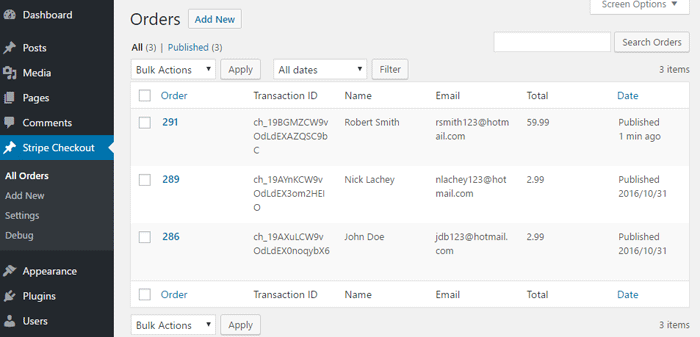
Stripe Orders
When you receive a new order you will be able to view it in the orders menu.
WP Stripe Checkout Add-ons
WP Stripe Checkout plugin comes with various add-ons that you can use to enhance its functionality on your website.
Variable Price
Variable Price addon lets customers set the amount they will pay. It can also be used for accepting donation payments via the Stripe payment gateway.
Variable Quantity
Variable Quantity add-on lets customers set the quantity they will purchase. This is done by creating adjustable product quantity fields for Stripe payment buttons.
Submit Type
Submit Type add-on allows you to customize the type of the submit button that appears on the Stripe payment page.
Terms of Service
Terms of Service add-on allows you to show a terms of service checkbox on the Stripe payment page.
Payment Link Email
Payment Link Email add-on can collect email addresses from buyers and prefill on the Stripe payment page.
Variable Currency
Variable Currency add-on lets customers pay in their preferred currency. It can be great for accepting donation payments via the Stripe payment gateway.
WP User Tracking
WP User Tracking add-on tracks payments made by logged-in WordPress users on your website.
WP User Only Button
WP User Only Button add-on allows only logged-in WordPress users to view payment buttons.
Product SEO
Product SEO add-on helps search engines and AI crawlers discover products.

* Variable Price
* Variable Quantity
* Submit Type
* Terms of Service
* Payment Link Email
* Variable Currency
* WordPress User Tracking
* WordPress User Only Button
* Product SEO
License: Unlimited Websites
Note:
* Do not purchase before setting up the core plugin first. The add-on is not at fault if the core plugin does not work on your website.
* Do not purchase if you are not sure about a feature, contact us instead.
* Do not purchase to ask for more features or make the product work in a certain way.
How to Use Stripe Payment Links
Payment link is a Stripe feature that allows you to sell online easily. You can create payment links with a few clicks and share easily with your customers to accept payments. When someone follows a payment link, they will go straight to the Stripe payment page. This makes the checkout process faster and easier for customers without you having to worry about coding.
If you wish to integrate Stripe payments links with our plugin you can follow this method.
1. Create a Payment Link
Log in to your Stripe account dashboard and navigate to the Payment links page (Payments > Payment links). Select an existing payment link or create a new one (by selecting an existing product or adding a new one). You can create payment links for one-time or recurring subscription payments.
2. Use the Payment Link in a Shortcode
Add the following shortcode to a post/page to create a button with the payment link.
[wp_stripe_checkout_payment_link url="https://buy.stripe.com/live_6gPE4jw7dMbUKdd3345"]
Replace the value of url with your payment link url.
Shortcode Parameters
Stripe payment link shortcode currently supports the following parameters:
button_text
The text displayed inside the button (optional). The default is “Buy Now”.
[wp_stripe_checkout_payment_link url="https://buy.stripe.com/live_6gPE4jw7dMbUKdd3345" button_text="Pay Now"]
button_image
If you want a custom image to act as the button you can use the button_image parameter instead (optional). The default is a plan button with the text “Buy Now”.
[wp_stripe_checkout_payment_link url="https://buy.stripe.com/live_6gPE4jw7dMbUKdd3345" button_image="https://example.com/wp-content/uploads/pay-now-button.png"]
target
You can specify whether the payment link button should open in a new tab (optional). By default this parameter is not set.
[wp_stripe_checkout_payment_link url="https://buy.stripe.com/live_6gPE4jw7dMbUKdd3345" target="_blank"]
class
Custom CSS class for the button (optional).
[wp_stripe_checkout_payment_link url="https://buy.stripe.com/live_6gPE4jw7dMbUKdd3345" class="btn"]
Multiple CSS classes can be added in a space-delimited format.
[wp_stripe_checkout_payment_link url="https://buy.stripe.com/live_6gPE4jw7dMbUKdd3345" class="btn btn2 btn3"]
prefill_wp_email
If you would like the email address of a user to be automatically prefilled and passed to Stripe when they are logged in to WordPress, you can add the “prefill_wp_email” parameter for it.
[wp_stripe_checkout_payment_link url="https://buy.stripe.com/live_6gPE4jw7dMbUKdd3345" prefill_wp_email="1"]
lock_prefill_wp_email
This is an alternative to prefill_wp_email. It makes the passed email address uneditable on the Stripe payment page.
[wp_stripe_checkout_payment_link url="https://buy.stripe.com/live_6gPE4jw7dMbUKdd3345" lock_prefill_wp_email="1"]
Custom Button/Link Integration
If you have a custom button/link that you wish to integrate with our plugin and Stripe payment links, you can do so by adding “?client_reference_id=wpsc_payment_link” to the original payment link url.
https://buy.stripe.com/live_6gPE4jw7dMbUKdd3345?client_reference_id=wpsc_payment_link
Please note that our add-ons will not work with this custom button/link integration.
* Variable Price
* Variable Quantity
* Submit Type
* Terms of Service
* Payment Link Email
* Variable Currency
* WordPress User Tracking
* WordPress User Only Button
* Product SEO
License: Unlimited Websites
Note:
* Do not purchase before setting up the core plugin first. The add-on is not at fault if the core plugin does not work on your website.
* Do not purchase if you are not sure about a feature, contact us instead.
* Do not purchase to ask for more features or make the product work in a certain way.
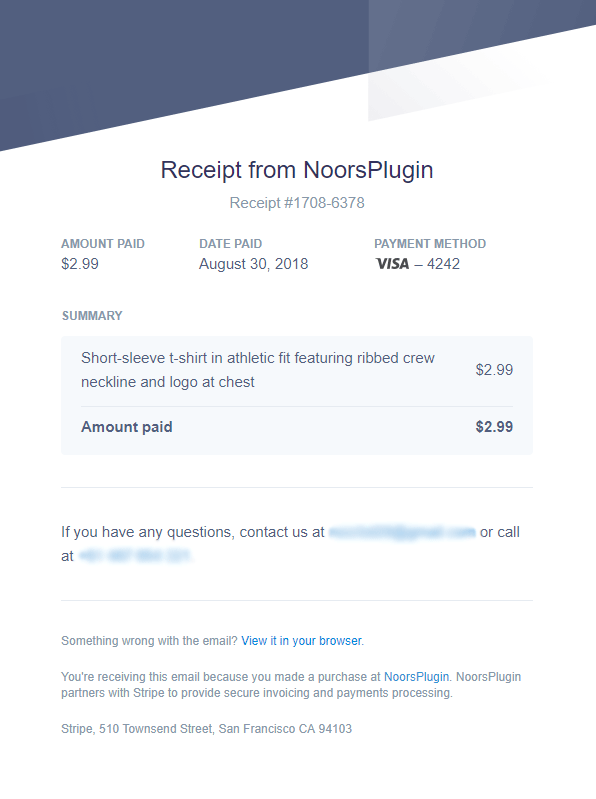
Stripe Email Receipt
Stripe can automatically send a receipt to your customer via email after completion of a purchase. All that is required for this option is the email address of the customer at checkout. The plugin will collect the email address entered in the simple pay form and notify Stripe so a receipt is automatically sent to the customer upon purchase.
Stripe Customer Portal
Stripe customer portal is a Stripe-hosted portal that allows your customers to manage their subscriptions and billing details themselves. The easiest way for your customers to access this portal is through a customer portal link that you can generate from your Stripe account dashboard.
How to Activate Stripe Customer Portal
1. Go to Settings > Billing > Customer portal from your Stripe account dashboard.
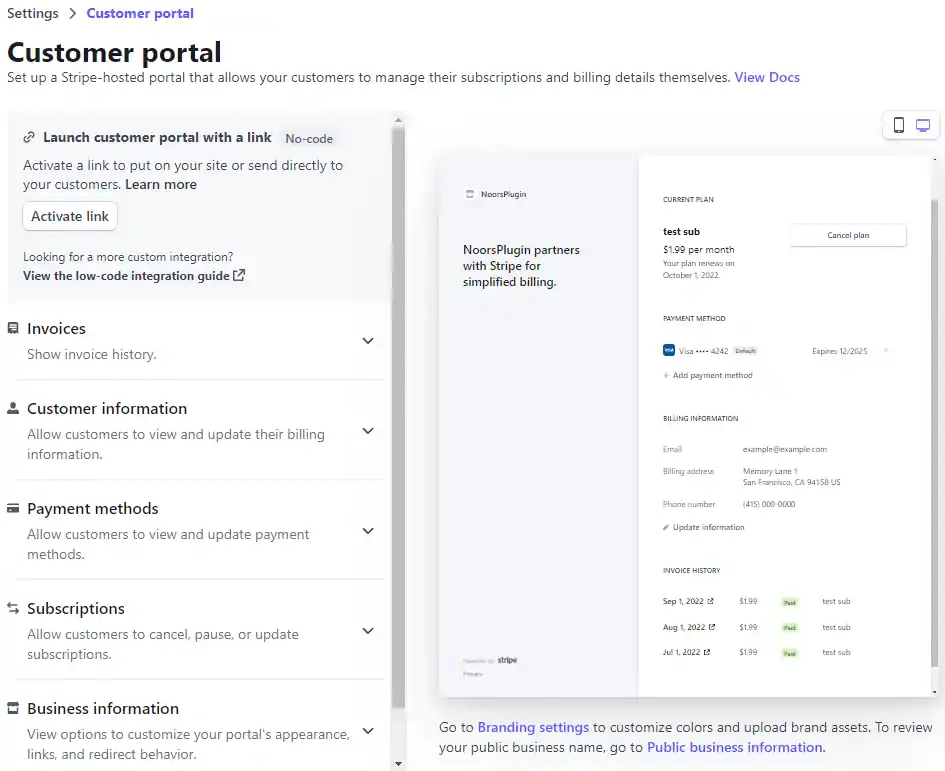
2. Click Activate link.
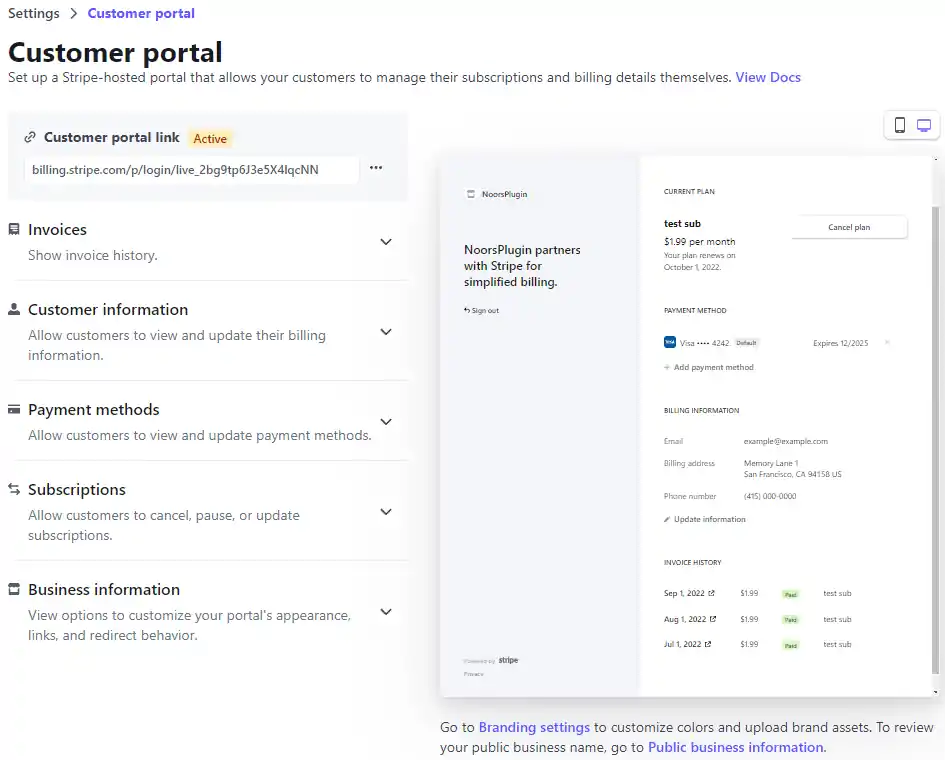
You can add the customer portal link to your website or send it to your customers via email.
Get All WP Stripe Checkout Add-ons
* Variable Price
* Variable Quantity
* Submit Type
* Terms of Service
* Payment Link Email
* Variable Currency
* WordPress User Tracking
* WordPress User Only Button
* Product SEO
License: Unlimited Websites
Note:
* Do not purchase before setting up the core plugin first. The add-on is not at fault if the core plugin does not work on your website.
* Do not purchase if you are not sure about a feature, contact us instead.
* Do not purchase to ask for more features or make the product work in a certain way.